OAuth
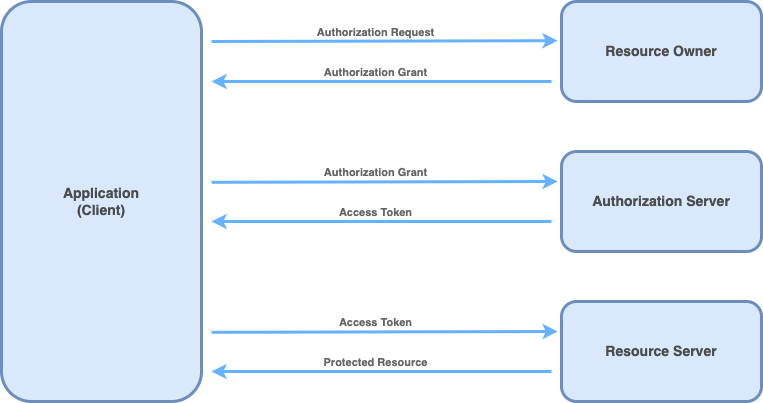
OAuth (Open Authorization) is a standard protocol that enables users to grant third-party applications limited access to their protected resources without sharing their credentials directly. The OAuth flow describes the sequence of steps through which this authorization and token exchange happens.
Basic OAuth Flow (Authorization Code Flow)
The most common and secure OAuth flow is the Authorization Code Flow, typically used by server-side web applications, mobile apps, and desktop apps interacting with APIs on behalf of users. Here’s how it works:
-
Client Registration: The client app (like a web application) registers with the OAuth authorization server, obtaining a client ID and client secret.
-
User Authorization Request: The app redirects the user to the OAuth server’s authorization endpoint, including its client ID, redirect URI, and requested access scopes.
-
User Login and Consent: The user authenticates at the OAuth server (if not already logged in) and is shown a consent screen to approve or deny the app’s access to their resources.
-
Authorization Code Issuance: Upon user approval, the OAuth server redirects the user back to the app’s specified redirect URI with an authorization code appended to the URL.
-
Token Exchange: The app’s backend sends a secure request to the OAuth server’s token endpoint, exchanging the authorization code along with its client credentials (client ID and secret) for an access token.
-
API Access: The app uses the access token to access protected resources on behalf of the user from resource servers (APIs).
OAuth Flow Schema
-
The login on ChargebackHelp portal starts from a redirect of the User on a specific URL provided to Partner: https://sandbox.chargebackhelp.com/external-oauth/{credentials}
The “credentials” identifier is provided by ChargebackHelp side.
-
ChargebackHelp identifies OAuth Configuration based on the “credentials” identifier
-
ChargebackHelp creates for the User a session and stores in it a specific “State” (a random string) which is available only on server side.
-
Based on OAuth Configuration the User is redirect back to Partner Application for authorization.
The redirect is made to Partner Authorization URL and the request contains:
- OAuth Client ID
- ChargebackHelp Callback URL
- State (from step 3)
-
Partner Applications assures the User is logged in and is eligible for using ChargebackHelp platform
-
Partner Application validates:
- OAuth Client ID
- ChargebackHelp Callback URL
-
Partner Application redirects the User to ChargebackHelp Callback URL
The redirect request contains:
- State (from step 4)
- Authorization Code – Partner Application must store and link internally the code with the User.
-
ChargebackHelp validates User session by comparing the original State stored in session and the one got from redirect – assures same User is redirect from step (3) to step (8)
-
ChargebackHelp requests an Access Token using the Authorization Code and the OAuth Credentials.
A request is sent to Partner Access Token URL and it contains:
- OAuth Client ID
- OAuth Client Secret
- ChargebackHelp Callback URL
- Authorization Code
-
Partner Application must validate Authorization Code – must be assured that the code is used only once and only at this step
-
Partner Application must validate OAuth Credentials provided within the request to assure authenticity of the request
-
Partner Application returns an Access Token. The Access Token must be stored and linked internally with the User which the Authorization Code belongs.
-
ChargebackHelp requests User Information using the Access Token by making a request to Partner User Information Fetch URL
-
Partner Application validates the Access Token - must be assured that the token is used only once and only at this step
-
Partner Application returns User Information.
The response must contain:
- Partner Application User ID (required)
- User Email (required)
- User Name (required)
- ChargebackHelp Partner ID (conditional) – if the user is eligible for a higher Role / Hierarchy
- ChargebackHelp Client ID (conditional) – can’t be provided with ChargebackHelp Partner ID
- Partner Application Client ID (conditional) - can’t be provided with ChargebackHelp Partner ID
- Control Role (required)
- Partner Administrator or Partner Read Only – eligible with a ChargebackHelp Partner ID
- Client Administrator or Client Read Only – eligible with a ChargebackHelp Client ID or Partner Application Client ID
- Product Role (required)
- Product Operator or Product Read Only
OAuth Implementation
ChargebackHelp will provide to Partner the following details:
- login_url - ChargebackHelp Login URL (step 1)
- client_id - OAuth Client ID
- client_secret - OAuth Client Secret
- redirect_uri - ChargebackHelp Callback URL (step 7)
Partner Application must implement 3 endpoints and share with ChargebackHelp
- Partner Authorization URL: GET /oauth/authorize
- Partner Access Token URL: POST /oauth/token
- Partner User Information Fetch URL: GET /oauth/user
Partner Authorization URL: GET /oauth/authorize (step 4)
ChargebackHelp will redirect User to Partner Application, using this endpoint.
Partner Application must assure that user is logged and generate an "Authorization Code".
Store the "Authorization Code" for further validation in Partner Access Token URL.
Link the "Authorization Code" with logged User.
Request query parameters:
-
client_id (string, required) – OAuth Client ID
-
redirect_uri (string, required) – ChargebackHelp Callback URL
-
response_type=code – fixed value
-
state (string, required) – random string for session validation
Response is a redirect to ChargebackHelp Callback URL with query parameters:
-
state (string, required) – same value provided in Request
-
code (string, required) – Authorization Code
Implementation Example:
Route::get('/oauth/authorize', function (Request $request) {
    // Validate "client_id" query parameter
    // Validate "redirect_uri" query parameter

    // Assure User is logged in Partner Application

    $authorizationCode = Str::random(32);

    // Store Authorization Code
    // Link the Authorization Code with the current logged User

    $params = [
        'code' => sha256($authorizationCode), // hashed auth code
        'state' => $request->input('state'), // include same "state" value from Request
    ];

    // Redirect to URL provided in Request
    return redirect($request->redirect_uri . '?' . http_build_query($params));
});
Request Example - ChargebackHelp
GET https://partner-application.test/oauth/authorize? \
    client_id=a03106ec-fb58-47b7-aded-03ae54dcc9d0 \
    &redirect_uri=https://sandbox.chargebackhelp.com/external-oauth/a03106ec-fb58-47b7-aded-03ae54dcc9d0/callback \
    &response_type=code \
    &scope= \
    &state=YceE1SItAoO2eLSoLgWr3Kj57R95ZMPOtJM6RwFv
Response Example - Partner Application
Redirect https://sandbox.chargebackhelp.com/external-oauth/a03106ec-fb58-47b7-aded-03ae54dcc9d0/callback? \
    code=47cc0e711c9b2504cbddc522a10dc578326be18279bfb3d78f85f4dd9057a688 \
    &state=c5Eb3IFUuuU4nzJ5Y9bwFXSQPn0aaegVTN483Y6U
Partner Access Token URL: POST /oauth/token (step 9)
Partner Application must exchange "Authorization Code" for an "Access Token"
The "Access Token" will be used to fetch User details from Partner Application
Partner Application must assure that an "Authorization Code" is used only once within the endpoint.
Partner Application must generate an "Access Token" and store it for further usage in Partner User Information Fetch URL
Partner Application must link the "Access Token" with User which was linked by "Authorization Code"
Request POST form parameters:
-
client_id (string, required) – OAuth Client ID
-
client_secret (string, required) – OAuth Client Secret
-
redirect_uri (string, required) – ChargebackHelp Callback URL
-
grant_type=authorization_code – fixed value
-
code (string, required) – Authorization Code
Response JSON Payload:
-
token_type=Bearer – token type
-
access_token (string, required) – Access Token (it can be a JWT Token)
Response Headers:
- Content-Type: application/json
Implementation Example:
Route::post('/oauth/token', function (Request $request) {
    // Validate "client_id" POST Form Parameter
    // Validate "client_secret" POST Form Parameter
    // Validate "redirect_uri" POST Form Parameter

    // Validate "code" POST Form Parameter as Authorization Code stored previously in DB
    // Remove the Authorization Code from DB, it is allowed for usage only once

    // Generate an Access Token
    // Store the Access Token in DB
    // Link the Access Token with the User previously linked with Authorization Code

    return response()->json([
        'token_type' => 'Bearer',
        'access_token' => $accessToken,
    ]);
});
Request Example - ChargebackHelp
POST https://partner-application.test/oauth/token? \
    --header 'Accept: application/json' \
    --form 'grant_type="authorization_code"' \
    --form 'client_id="a03106ec-fb58-47b7-aded-03ae54dcc9d0"' \
    --form 'client_secret="WHCYpTveDivcyv6zYZHN29qtDVsk5RHrrKXB1ksd"' \
    --form 'redirect_uri="https://sandbox.chargebackhelp.com/external-oauth/a03106ec-fb58-47b7-aded-03ae54dcc9d0/callback"' \
    --form 'code="47cc0e711c9b2504cbddc522a10dc578326be18279bfb3d78f85f4dd9057a688"'
Response Example - Partner Application
{
    "token_type": "Bearer",
    "access_token": "eyJ0eXAiOiJKV1QiLCJhbGciOiJIUzI1NiJ9.eyJqdGkiOiI2OGZmNjk4MTNhNTY5IiwiaWF0IjoxNzYxNTY5MTUzLCJleHAiOjE3NjE1NjkzMzN9.4t-fCjIi8EhO_l4yUtj6w1wvjY59Rjhngn5M-7k-M0Q"
}
Partner User Information Fetch URL: GET /oauth/user (step 13)
Depending on what level of hierarchy in ChargebackHelp the OAuth integration is requested, the Partner Application can transfer users for Partner or Clients in ChargebackHelp
- Partner OAuth Level - Partner Application can transfer users for Partner or Clients
- Client OAuth Level - Partner Application can transfer users only for Clients
Request Headers:
- Authorization: Bearer {access_token}
Response JSON Payload:
-
external_id (string, required) - Partner Application User ID
-
email (string, required) – User email
-
name (string, required) – User name
-
type (string, required) – User Type (enum: partner, client)
-
client_id (string, conditional) - ChargebackHelp Client ID
-
client_name (string, conditional) - ChargebackHelp Client Name
-
client_external_id (string, conditional) - Partner Application Client ID
-
control_role (string, required)
- For a Partner type User
- Partner Administrator – has access to manage its Clients, Merchants, Descriptors, etc.
- Partner Read Only – has access to only view its Clients, Merchants, Descriptors, etc.
- For a Client type User
- Client Administrator - has access to manage its Merchants, Descriptors, etc.
- Client Read Only – has access to only view its Merchants, Descriptors, etc
-
product_role (string, required)
- Product Operator – has access to manage its Alerts, Chargebacks, RDRs, etc.
- Product Read Only - has access to only view its Alerts, Chargebacks, RDRs, etc.
Response Headers:
- Content-Type: application/json
Implementation Example:
Route::get('/oauth/user', function (Request $request) {
    $accessToken = $request->header('Authorization');

    // Validate "Authorization" header from request as Access Token stored previously in DB
    // Remove the Access Token from DB, it is allowed for usage only once
    // Get related User linked with the Access Token

    $user = $this->getUserByAccessToken($accessToken);

    return response()->json([
        'external_id' => $user->id, // Partner Application User ID
        'email' => $user->email,
        'name' => $user->name,
        'type' => 'client,
        'client_id' => $user->client_id, // ChargebackHelp Client ID
        'control_role' => 'Client Read Only',
        'product_role' => 'Product Operator',
    ]);
});
Partner OAuth Level - Create Partner User
Request Example - ChargebackHelp
GET https://partner-application.test/oauth/user \
    --header 'Accept: application/json' \
    --header 'Authorization: Bearer eyJ0eXAiOiJKV1QiLCJhbGciOiJIUzI1NiJ9.eyJqdGkiOiI2OGZmNjk4MTNhNTY5IiwiaWF0IjoxNzYxNTY5MTUzLCJleHAiOjE3NjE1NjkzMzN9.4t-fCjIi8EhO_l4yUtj6w1wvjY59Rjhngn5M-7k-M0Q'
Response Example - Partner Application
{
    "external_id": "{external_id}",
    "email": "partner@test.test",
    "name": "Partner User Name",
    "type": "partner",
    "control_role": "Partner Read Only",
    "product_role": "Product Operator"
}
Partner OAuth Level - Create Client User
Request Example - ChargebackHelp
GET https://partner-application.test/oauth/user \
    --header 'Accept: application/json' \
    --header 'Authorization: Bearer eyJ0eXAiOiJKV1QiLCJhbGciOiJIUzI1NiJ9.eyJqdGkiOiI2OGZmNjk4MTNhNTY5IiwiaWF0IjoxNzYxNTY5MTUzLCJleHAiOjE3NjE1NjkzMzN9.4t-fCjIi8EhO_l4yUtj6w1wvjY59Rjhngn5M-7k-M0Q'
Response Example - Partner Application
{
    "external_id": "{external_id}",
    "email": "client@test.test",
    "name": "Client User Name",
    "client_id": 1,
    "type": "client",
    "control_role": "Client Read Only",
    "product_role": "Product Operator"
}
Client OAuth Level - Create Client User
Request Example - ChargebackHelp
GET https://partner-application.test/oauth/user \
    --header 'Accept: application/json' \
    --header 'Authorization: Bearer eyJ0eXAiOiJKV1QiLCJhbGciOiJIUzI1NiJ9.eyJqdGkiOiI2OGZmNjk4MTNhNTY5IiwiaWF0IjoxNzYxNTY5MTUzLCJleHAiOjE3NjE1NjkzMzN9.4t-fCjIi8EhO_l4yUtj6w1wvjY59Rjhngn5M-7k-M0Q'
Response Example - Partner Application
{
    "external_id": "{external_id}",
    "email": "client@test.test",
    "name": "Client User Name",
    "type": "client",
    "control_role": "Client Read Only",
    "product_role": "Product Operator"
}